Course Expert Handbook

Here you will find all information regarding the Course Expert program!
 Tutorials
Studydrive at a glance
Get some first insights - we'll shortly introduce the platform and the Course Expert program.
How do I upload?
Easily join your university courses, in which you can upload your study material, such as lecture notes, summaries etc.
How do I earn money?
Find out how you can earn money as a Course Expert and get the most out of the program.
Road to success
Get an overview of what you have to do as a Course Expert in order to earn money.


Your Dashboard
In your dashboard, you can find all the necessary information you need as a Course Expert.
That way, you can keep an overview of your current status and can see what you need to do to reach the next bonus.
In the top right corner, you can see your current earnings. If you click on it or hover the mouse over it, an exact breakdown of your earnings will be revealed.

Below this, you'll find the Course Expert terms and conditions that you have already accepted when you registered as a Course Expert. To their right side, you'll see our Help button - here you can find the most important information regarding the Course Expert program all conveniently gathered in one place. Many questions that may arise, especially when starting as a Course Expert, are already answered there.
€10 Bonus
Get your first €10 right away by completing just a few simple tasks. This bonus is paid out once a semester. By going through this handbook, you have already completed one of the tasks!
You can earn this bonus again every semester by completing the tasks again. Of course, watching the tutorials, reading the handbook, installing the app, and setting up a profile picture remain checked off in that case.

€25 Bonus
You got your €10 bonus and are looking at what to do next? Check out 4 tasks that will get you the €25 bonus. You have the whole semester to do it so don't be stressing, just keep on progressing.

Gold challenge
Fulfill this challenge to get a €5 bonus and double the amount of money earned per download/view. You can complete the Gold challenge every two weeks or, as we say, once per period. Period 1 lasts from the 1st to the 14th of each month and period 2 from the 15th to the end of the month. For example, if you complete the challenge on the final day of period 1 (the 14th), you will receive twice as much money for all downloads/views generated throughout that entire period (from the 1st all the way to the 14th).

The tasks of the challenge are made up of:
- uploading 2 documents,
- promoting Studydrive and your documents in a social network and
- making 10 posts or comments in your groups/ courses on Studydrive
You can send us screenshots of your social media posts via WhatsApp or by email. We will manually tick off the requirement on your account within two working days of receiving your proof. You can find our contact information at the bottom of this page.
Gold+ Challenge
You have the entire semester to complete the Gold+ challenge. The displayed end date of this challenge is also the final day of your Course Expert semester.
But the earlier you fulfill the tasks of the challenge, the sooner you will benefit from it!

As soon as all tasks have been completed, it goes like this: every time you achieve the Gold challenge, you automatically jump to Gold+ and receive a bonus of €10 instead of €5. Therefore, it's worth completing the tasks as soon as possible.
Upload documents 
You can upload all documents on Studydrive that you created yourself for your classes at university. Whether it's solutions to old exams, answers to exercises, summaries, lecture notes, or flashcards - there are plenty of document types that can help you and your fellow students during the semester.
When uploading documents, pay special attention to our Dos & Don’ts:
Dos:
- You can upload self-created documents, notes, summaries, and solutions.
- You can upload typed or handwritten files.
- You can upload up-to-date and still relevant documents, also from previous semesters.
- You can upload these file types: .pdf, .doc, .docx, .jpeg, .png, .xls.
- Please name your documents appropriately and explain the content in the description. Make sure both the title and description are informative for your classmates. You cannot change the title afterward.
Don’ts:
- Do not upload entire books, articles, or lecture slides.
- Do not upload single photos of multi-page documents. Merge the documents if they belong in the same teaching unit.
- Do not upload the following file types: .zip und .rar (no previews = less downloads/views).
- Pay attention to the quality of your documents, for example, don't upload a page with only a few sentences - use the discussion area of the course instead.
- Do not upload non-study related or copyright protected documents.
Click here to get to the upload page.
When uploading your document, be sure to add information, such as the semester, the document type, and description. Please make sensible use of the description field - similar to the title - and briefly explain the document's content. Attention: you cannot change the title afterward! Additionally, there are optional input fields and the possibility to upload the document anonymously.
If you have created the document yourself, make sure to set the "self-created" mark. You'll benefit from a €2 bonus per document as soon as it reaches at least 15 downloads/views.

You also have the possibility to create flashcards, which you can use to study for exams. As soon as your set consists of at least 15 flashcards, it will be counted the same as a document (this only relates to the payment per learner - a flashcard set is not considered a document for any challenge). If you want your flashcards to be set to "public", make sure there are at least 5 flashcards.
Your payment
As a Course Expert, you can earn up to €500 per semester. You are collecting the money in your Course Expert account throughout the semester and we will pay it out at the end of the semester.
You can earn money through downloads/views on your documents, as well as through other activities on the platform. You'll find detailed information regarding the payment in the terms and conditions.
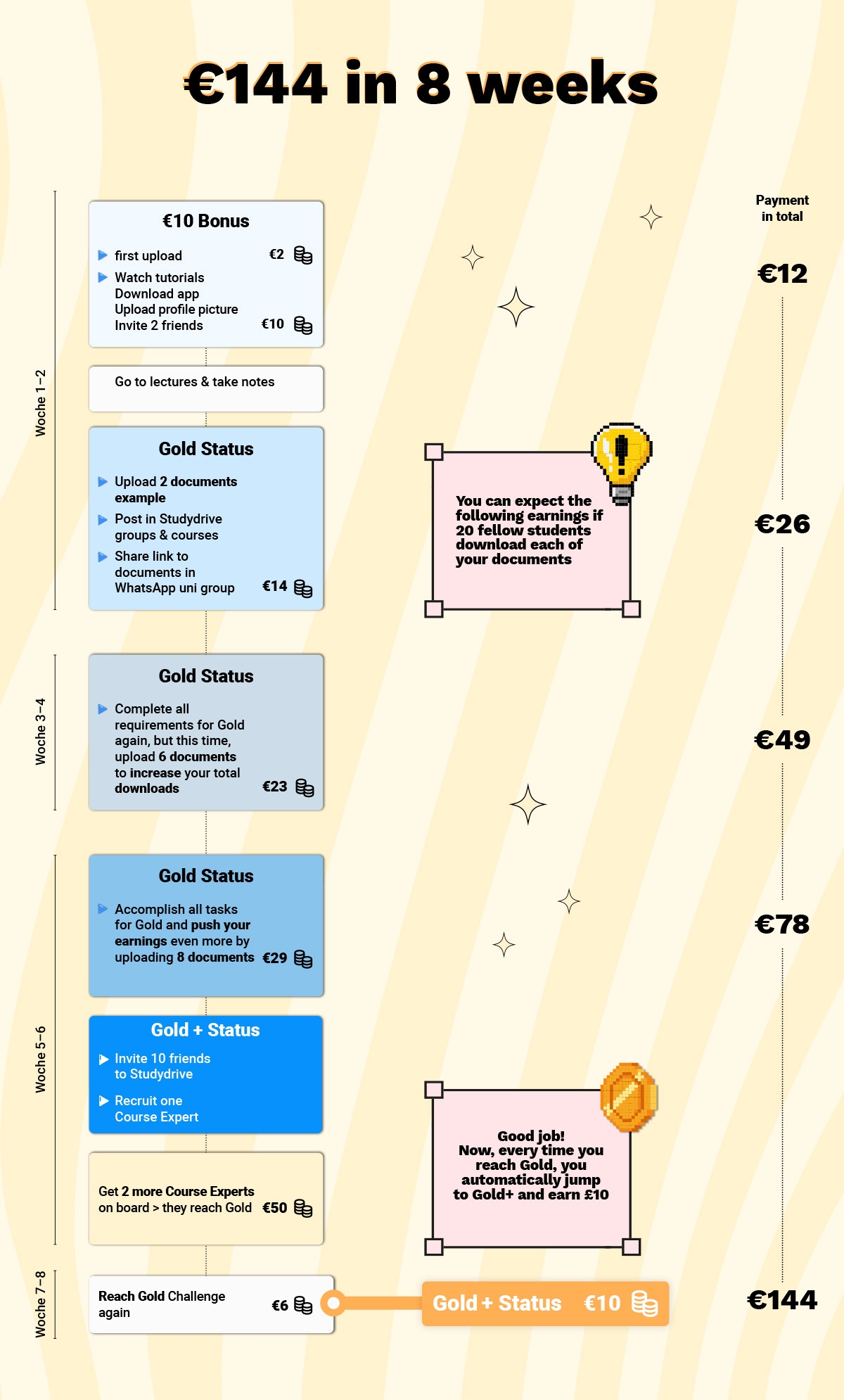
How you can earn €144 in 8 weeks
Here is an example of how you can earn €144 in only 8 weeks. Please be aware, that this is attached to certain conditions.
Generally, the more high-quality documents you upload and the more you share them with your classmates, the more downloads/views and money you get.
Payment
Within 30 workings days after the end of the semester (you can find the end date in your dashboard at the Gold+ challenge) you will receive an invoice template from us via email. There, you'll just have to fill in your personal information such as bank details and confirm the invoice.
From here on it can take up to 30 working days until the money will be transferred to your bank account.
Premium for Course Experts
As a Course Expert, you have three different options to get Premium:
1. Sign up for a paid subscription with us.
2. Buy Premium with credits. You earn credits with downloads on your documents from previous semesters. 3. Get Premium by completing the Gold Challenge:
We always credit Premium to you after the first period of the month, whereas we take the two previous periods into consideration. If you have reached Gold at least once during that time, you will get one month of Premium from us.
Here are the periods explained once again:
1. Period = 1st-14th of the month
2. Period = 15th - end of the month
You can reach the Gold Status like this:
- Upload 2 documents
- Share Studydrive with your network
- Make at least 10 posts on Studydrive
You can read more about this in the FAQ.
This way, you can get Studydrive Premium every month without having to spend any money.
And of course, you will still receive the 5 € (or 10 € for Gold+) and double the money for downloads from the Gold Challenge.
Semesterzeiten 
At Studydrive, we have two semesters, which are as follows:
Summersemester
The official start of Summersemester for Course Experts is April 01. in Germany.
You are registered as a course expert in Germany between February 01. and July 31. and the end of semester is September 30.
Wintersemester
The official start of Wintersemester for Course Experts is October 01. in Germany.
You are registered as a course expert in Germany between August 01. and January 31. and the end of semester is March 31.
Posting Bible 
You need tips for your social media posts or on how to invite friends?
Check out our Posting Bible and let us know if you still have questions by reaching out via WhatsApp or email.
FAQ 
In case you didn't find the answer you were looking for in here, check out our FAQ.
You can find those in the Course Expert group.
Contact us
You can reach us Mondays to Fridays between 9:00 am and 6:00 pm via email or through the Course Expert group. Simply write us an email to team@ce.studydrive.net or use the Course Expert group to get in touch with us or other Course Experts.